タッチタイピングの練習方法
ブラインドタッチを身につける完全ガイド
最終更新: 2026-03-27
タッチタイピングとは
タッチタイピング(ブラインドタッチ)とは、キーボードを見ずに文字を入力する技術のことです。「タッチタイピング」と「ブラインドタッチ」は同じ意味で、正式には「タッチタイピング」と呼ばれます。
タッチタイピングができると何が変わるか
- 入力速度が2〜3倍に向上
- 画面を見ながら入力できるので、ミスに気づきやすい
- 肩や首への負担が軽減(下を向かなくなるため)
- 仕事や勉強の効率が大幅にアップ
ホームポジションを覚えよう
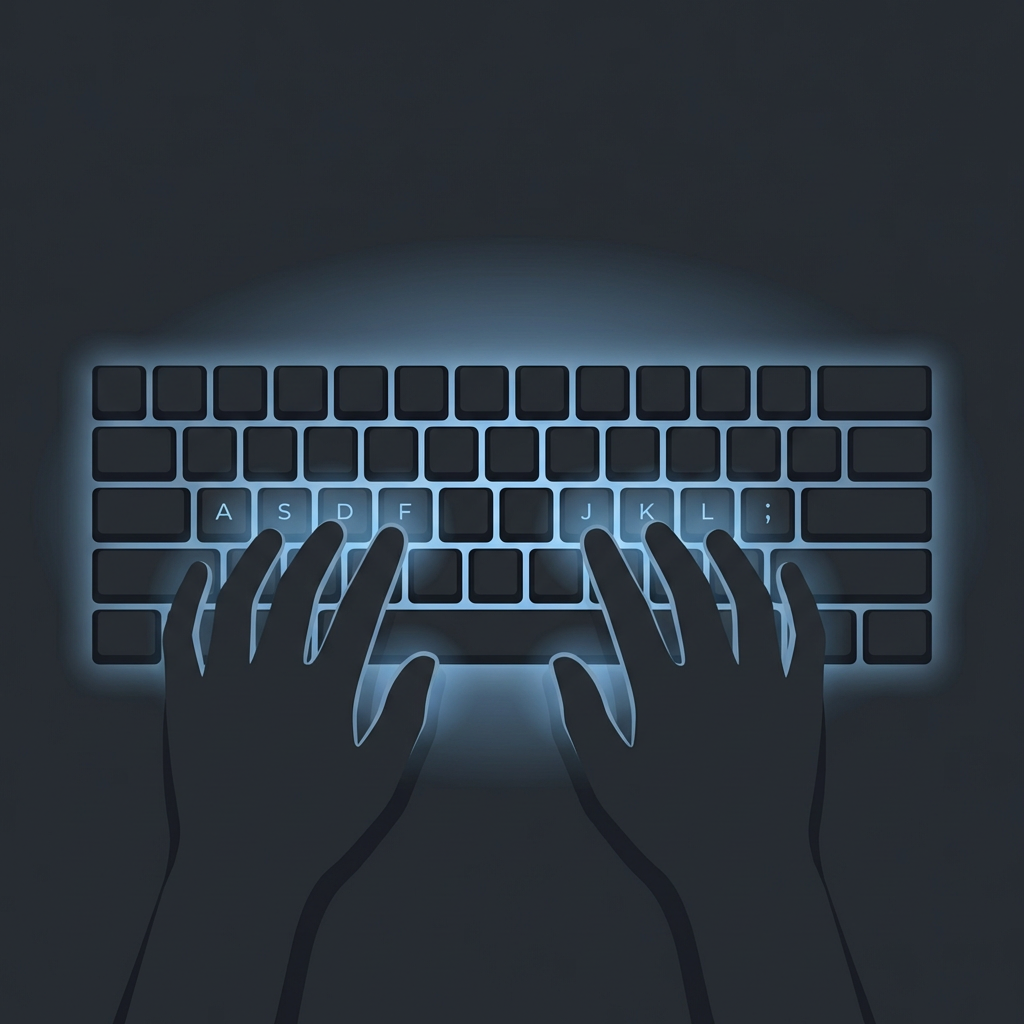
タッチタイピングの基本は「ホームポジション」です。タイピングを始める前に指を置く位置のことで、ここを覚えることがすべてのスタートです。
F・Jキーの突起が目印
キーボードのFキーとJキーには小さな突起(突起線やドット)がついています。これが人差し指のホームポジションの目印です。触るだけで正しい位置を見つけられるので、キーボードを見る必要がありません。
左手の配置
小指 → A
薬指 → S
中指 → D
人差し指 → F
右手の配置
人差し指 → J
中指 → K
薬指 → L
小指 → ;
親指 → スペースキー
各指の担当キー
それぞれの指には担当するキーが決まっています。正しい指で打つことで、最小限の指の移動で効率よくタイピングできるようになります。
ローマ字表記の新基準(2025年12月改定)
2025年12月、日本のローマ字のつづり方が約70年ぶりに改定されました。これまで小学校で教えていた「訓令式」から、英語に近い「ヘボン式」が基本になります。タイピング練習にも直接関わる変更です。
何が変わったのか
| 文字 | 旧(訓令式) | 新(ヘボン式) |
|---|---|---|
| し | shi | |
| ち | chi | |
| つ | tsu | |
| ふ | fu | |
| じ | ji | |
| しゃ | sha | |
| ちゃ | cha |
※ 助詞の「は」はキーボードでは「ha」、「を」は「wo」と入力します。また「ぢ」は「di」、「づ」は「du」と打ち分けます。これらはローマ字の表記ルールとは異なるタイピング独自の入力方法です。
タイピング練習への影響
ヘボン式はパスポートや駅名表示で既に広く使われており、英語の発音にも近いため自然に覚えられます。TypingTubeではヘボン式・訓令式どちらの入力も受け付けますが、このページの練習ドリルは新基準のヘボン式で統一しています。
学校教育の対応
学習指導要領解説も更新され、小学校の授業でも段階的にヘボン式中心の指導に移行する見込みです。これからローマ字を覚えるお子さんは、最初からヘボン式で練習するのがおすすめです。
タッチタイピングの練習方法【5ステップ】
ホームポジションに手を置く
F・Jキーの突起を目印に、両手をホームポジションに置きましょう。最初は何度もこの位置に戻ることを意識してください。
母音(あ行)から始める
日本語のローマ字入力は母音が最も多く使われます。A・I・U・E・Oの5つのキーの位置を指で覚えましょう。母音だけでも入力の半分以上をカバーできます。
子音を1行ずつ追加する
母音が打てるようになったら、K行(か行)、S行(さ行)と順番に子音を追加していきます。一度に全部覚えようとせず、少しずつ増やすのがコツです。
単語から短文へ実践練習
個々のキーが打てるようになったら、単語や短い文章でつなげて練習します。実際の文章を打つことで、キーの組み合わせが身につきます。
好きな曲の歌詞で楽しく練習
基礎が身についたら、好きな曲の歌詞でタイピング練習をしましょう。楽しく練習できるので、自然と長時間取り組めます。
上達が速くなる5つのコツ
絶対にキーボードを見ない
最初は遅くなっても、絶対にキーボードを見ないことが大切です。見てしまうと指がキーの位置を覚えないため、いつまでもタッチタイピングが身につきません。
正確性をスピードより優先する
速く打とうとして間違いだらけになるのは逆効果です。まずはゆっくりでも正確に打つことを心がけましょう。正確に打てるようになれば、スピードは自然と上がります。
毎日10分の短時間練習
1日10分の練習を毎日続ける方が、週末にまとめて1時間練習するより効果的です。短い時間でも毎日の積み重ねが上達への近道です。
正しい指で打つことを徹底する
慣れてくると自己流の指使いになりがちですが、正しい指で打つことを徹底しましょう。最初は遅くても、正しいフォームの方が最終的なスピードの上限が高くなります。
楽しく続ける工夫をする
タイピングゲームや歌詞タイピングなど、楽しく練習できる方法を取り入れましょう。モチベーションを保つことが上達の最大の秘訣です。
レベル別の練習の進め方
完全初心者(0→基礎)
ホームポジションを覚え、母音→子音の順に練習。1日10分で2〜4週間が目安です。キーボードは絶対に見ないことを徹底しましょう。
初級者(基礎→実用レベル)
短文を正確に打てるようになったら、長めの文章に挑戦。TypingTubeでLv.1〜2の曲をプレイしてみましょう。1〜2ヶ月で実用的なスピードになります。
中級者以上(速度アップ)
正確に打てるようになったら、より速いテンポの曲やLv.3以上の曲に挑戦。苦手なキーを意識的に練習することで、さらなるスピードアップが望めます。
よくある質問
タッチタイピングの習得にはどれくらいかかりますか?
正しい方法で毎日10分練習すれば、2〜4週間で基礎は身につきます。実用的なスピード(1分間に40〜60文字)になるまでには1〜3ヶ月が目安です。
かな入力とローマ字入力、どちらがいいですか?
ローマ字入力がおすすめです。覚えるキーが少なく(26文字のアルファベット)、英語入力にもそのまま使えるためです。
タイピング練習ソフトは有料のものが必要ですか?
Webサイトで十分です。TypingTubeなら好きな曲の歌詞で楽しく練習でき、登録不要です。
何歳からタッチタイピングを始められますか?
キーボードに手が届く年齢(小学1〜2年生頃)から始められます。小学3年生でローマ字を習うタイミングで本格的に取り組むのが一般的です。